It starts small. One morning the printer grabs two sheets instead of one, and you shrug it off. A week later it's happening on every third print. By the end of the month you're standing over the machine feeding paper one sheet at a time like it's 1994, and someone in the office has started calling the printer names.
We see this at the counter almost every day. And nine times out of ten, the customer has already tried the two things the internet told them to try — reinstalling the driver, and buying a fresh ream of paper. Neither works, because neither one is the problem.
The problem is almost always rubber.
What's actually happening inside the machine
Your printer doesn't lift paper. It grips it and drags it.
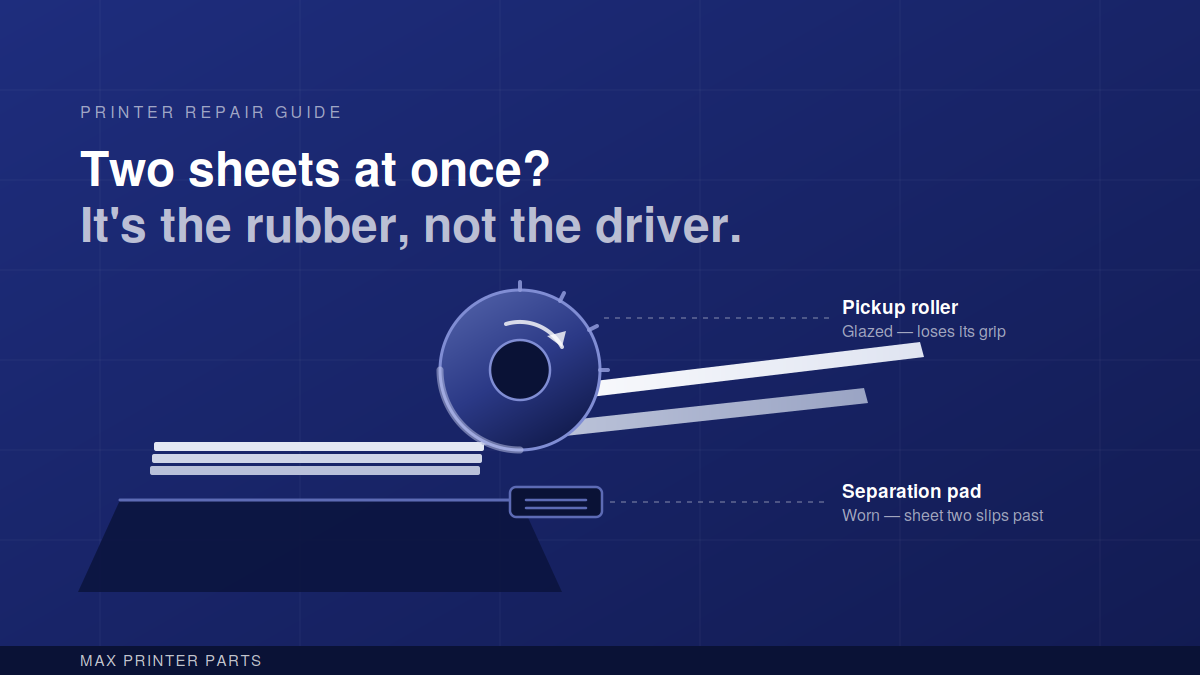
Sitting above the tray is a pickup roller — a small rubber wheel, usually grey or black, mounted on a plastic shaft. When you hit print, that roller drops onto the top sheet, spins about half a turn, and pulls the sheet forward into the feed path. Directly opposite it, or just downstream, sits a separation pad: a small rubber or cork block under light spring pressure whose only job is to hold back the second sheet while the first one goes through.
That's the whole mechanism. One part pulls, one part resists. The gap between how hard the roller grips and how hard the pad resists is what separates one sheet from the stack.
Rubber doesn't stay grippy. Every sheet of paper that passes over that roller leaves behind a thin film of paper dust and clay coating. Over thousands of pages, that film builds up and polishes the rubber smooth — the same way a car tyre goes bald. At the same time the rubber itself hardens and shrinks slightly as the plasticisers evaporate out of it. A roller that started life with a soft, tacky surface ends up hard, shiny and about as grippy as a marble.
So the roller loses its grip on the top sheet. The stack slides forward as a block instead of separating. Two sheets go in. Sometimes three.
The opposite failure looks different but comes from the same place. When the roller is so far gone that it can't drag anything at all, you get the "no paper" error on a tray that's clearly full. Same worn part, further along.
Why it happens faster in India than in the manual's estimate
Manufacturers rate pickup rollers for somewhere between 50,000 and 100,000 pages. In a clean, air-conditioned European office, they get there.
In a shop on a main road in Mumbai, in a school office in Raipur, in a chemist's counter with the shutter open all day, they don't. Three things eat rollers faster here:
Dust. Ambient dust settles on the top sheet in the tray. Every sheet you print is a fine abrasive pad running across the rubber. Open trays and printers stored uncovered overnight take the worst of it.
Recycled and low-GSM paper. Cheaper paper sheds far more dust and has a rougher, more abrasive coating. It's not that the paper is "bad" — it's that it wears rubber faster. If you're printing bills or challans on 65 GSM stock all day, budget for rollers more often.
Humidity swings. Monsoon damp makes paper swell and stick together sheet-to-sheet; the dry months make rubber harden faster. Printers in coastal cities get both problems in the same year.
Realistically, a busy machine in Indian conditions needs pickup rollers somewhere between the 20,000 and 40,000 page mark. If yours has lasted longer, you've been lucky or you've been cleaning it.
Try cleaning first — it costs nothing
Before you buy anything, spend ten minutes on this. On a roller that's dirty but not yet hardened, cleaning brings the grip straight back and can buy you months.
Power the printer off and unplug it. Pull the paper tray out completely. Look up into the cavity and you'll see the roller — on most HP and Canon desktop lasers it's directly visible; on Epson and Brother inkjets you may need to look through the rear access door.
Take a lint-free cloth, dampen it with plain water, and wipe the roller firmly while rotating it by hand. Do the full circumference. You'll see grey-black grime come off onto the cloth. Do the separation pad the same way. Let both dry for five minutes before reassembling.
Two warnings. Don't use isopropyl alcohol, thinner or petrol — they strip the rubber and speed up hardening, so you'll gain a week and lose six months. And don't sand or scuff the roller with paper, which is advice you'll find on forums; it works for one day and destroys the surface.
If cleaning fixes it, put a reminder in your phone to repeat it every couple of months.
How to tell when it's genuinely finished
Press your thumbnail into the roller surface. Healthy rubber gives slightly and feels tacky. A dead roller feels hard and slick, and often has a visible glaze on it — the surface reflects light where it should look matte.
Look for flat spots too. A printer left loaded for weeks in one position develops a flattened section where the roller rested against the stack, and you'll notice the misfeed happens rhythmically, once per rotation.
If it's hard, shiny, cracked or flat-spotted, cleaning won't help. Replace it.
Replace the pad at the same time
This is the part people skip, and it's why some replacements don't fix the problem.
The roller and the separation pad wear as a pair. Fit a fresh, grippy roller against a worn, glazed pad and you swap one symptom for another — now the pad can't hold back sheet two, so the multi-feed continues. Both parts are inexpensive. Change them together and you're done for another two or three years.
While you have the tray out, check the tray's own separation pad if your model has one, and look for a plastic separation claw at the corner of the stack. A bent claw causes the same fault and costs nothing to straighten.
Getting the right part the first time
Pickup rollers are model-specific, and the visual differences between them are small — same diameter, slightly different hub, completely incompatible. Ordering by eye from a photo goes wrong often.
Two things get you the correct part every time. First, the exact model number from the label on the printer, not the series name: HP LaserJet P1108, not "HP LaserJet". Second, the part number from the old component itself if it's readable — most OEM rollers carry a code moulded into the plastic hub, like RL1-1442 or RM1-6414.
If you can't find either, photograph the roller in place and the printer's rating label and send both to us on WhatsApp at +91 99300 01445. It takes us a minute to identify, and it saves you a return.
A pickup roller and pad set for most common desktop models runs a few hundred rupees. Against a service call, or against the hour a day someone spends babysitting a misfeeding printer, it's the cheapest fix in the machine.